Functions
At the most basic level, you can think of functions as a set of instructions that take an input and return and outputs.
For example, the primary task of the print function is to print a value. This value is usually printed to the screen and it’s passed to the print function as argument.
Function
A Python function is a modular piece of code that can be re-used repeatedly. A function is declared using the
defkeyword followed by the name and task to complete.
def <function name>:
	<task to complete>
Optional parameters can also be added after the function name within a pair of parentheses.
def sum(x, y):
	return x + y
Examples
Calculate a tax amount for a customer, based on the total value of that bill.
'''
bill = 175.00

tax_rate = 15

total_tax = (bill * tax_rate) / 100.00

print('Total tax', total)
'''


def calculate_tax(bill, tax_rate):
	return (bill * tax_rate) / 100.00

print('Total tax:', calculate_tax(175.00, 15))
Total tax: 26.25WARNING
A function is only ever run when it’s actually being called.
TIP
One of the nice things about a function is that you can update it once and any part of the code that calls that function will get those changes as well.
Variable scope

Variables within the built-in and global scope are accessible from anywhere in the code.
The purpose of scope is to protect the variable, so it does not get changed by other parts of the code.
NOTE
As a rule, global scope is generally discouraged in applications as this increases the possibility of mistakes in outputs.
Global scope
# global scope
my_global = 10

def fn1():
	local_v = 5
	print('Access to Global', my_global)

fn1()
Access to Global 10# global scope
my_global = 10
def fn1():
local_v = 5
print('Access to Global', my_global)
print('Cant access local', local_v)Traceback (most recent call last):
File "PATH", line 8, in <module>
print('Cant access local', local_v)
^^^^^^^
NameError: name 'local_v' is not defined. Did you mean: 'locals'?That’s because it’s only accessible from within the local scope of the function fn1.
# global scope
my_global = 10

def fn1():

    enclosed_v = 8

    def fn2():
        local_v = 5
        print('Access to Global', my_global)
        print('Access to enclosed', enclosed_v)

    fn2()

fn1()
Access to Global 10
Access to enclosed 8# global scope
my_global = 10
def fn1():
enclosed_v = 8
def fn2():
local_v = 5
print('Access to Global', my_global)
print('Access to enclosed', enclosed_v)
fn2()
print(enclosed_v)
print(local_v)Traceback (most recent call last):
File "c:\Users\farna\Desktop\Test\test.py", line 15, in <module>
print(enclosed_v)
^^^^^^^^^^
NameError: name 'enclosed_v' is not definedBuilt-in scope refers to what’s called the reserved keywords, such as print and def. Built-in scope covers all the language of Python, which means you can access it from the outermost scopes or the innermost scopes in the function classes.
Function and variable scope
Functions and variables
It is essential to understand the levels of scope in Python and how things can be accessed from the four different scope levels. Below are the four scope levels and a brief explanation of where and how they are used.
1. Local scope
Local scope refers to a variable declared inside a function. For example, in the code below, the variable total is only available to the code within the get_total function. Anything outside of this function will not have access to it.
def get_total(a, b):
    #local variable declared inside a function
    total = a + b;
    return total

print(get_total(5, 2))
7

# Accessing variable outside of the function:
print(total)
NameError: name 'total' is not defined
2. Enclosing scope
Enclosing scope refers to a function inside another function or what is commonly called a nested function.
In the code below, I added a nested function called double_it to the get_total function.
As double_it is inside the scope for the get_total function it can then access the variable. However, the enclosed variable inside the double_it function cannot be accessed from inside the get_total function.
def get_total(a, b):
    #enclosed variable declared inside a function
    total = a + b

    def double_it():
        #local variable
        double = total * 2
        print(double)

    double_it()
    #double variable will not be accessible
    print(double)

    return total
3. Global scope
Global scope is when a variable is declared outside of a function. This means it can be accessed from anywhere.
In the code below, I added a global variable called special. This can then be accessed from both functions get_total and double_it:
special = 5

def get_total(a, b):
    #enclosed scope variable declared inside a function
    total = a + b
    print(special)

    def double_it():
        #local variable
        double = total * 2
        print(special)

    double_it()

    return total
4. Built-in scope
Built-in scope refers to the reserved keywords that Python uses for its built-in functions, such as print, def, for, in, and so forth. Functions with built-in scope can be accessed at any level.
What are data structures?
This reading introduces you to data structures. So far, you have only stored small bits of data in a variable. This was either an integer, Boolean or a string.
But what happens if you need to work with more complex information, such as a collection of data like a list of people or a list of companies?
Data structures are designed for this very purpose.
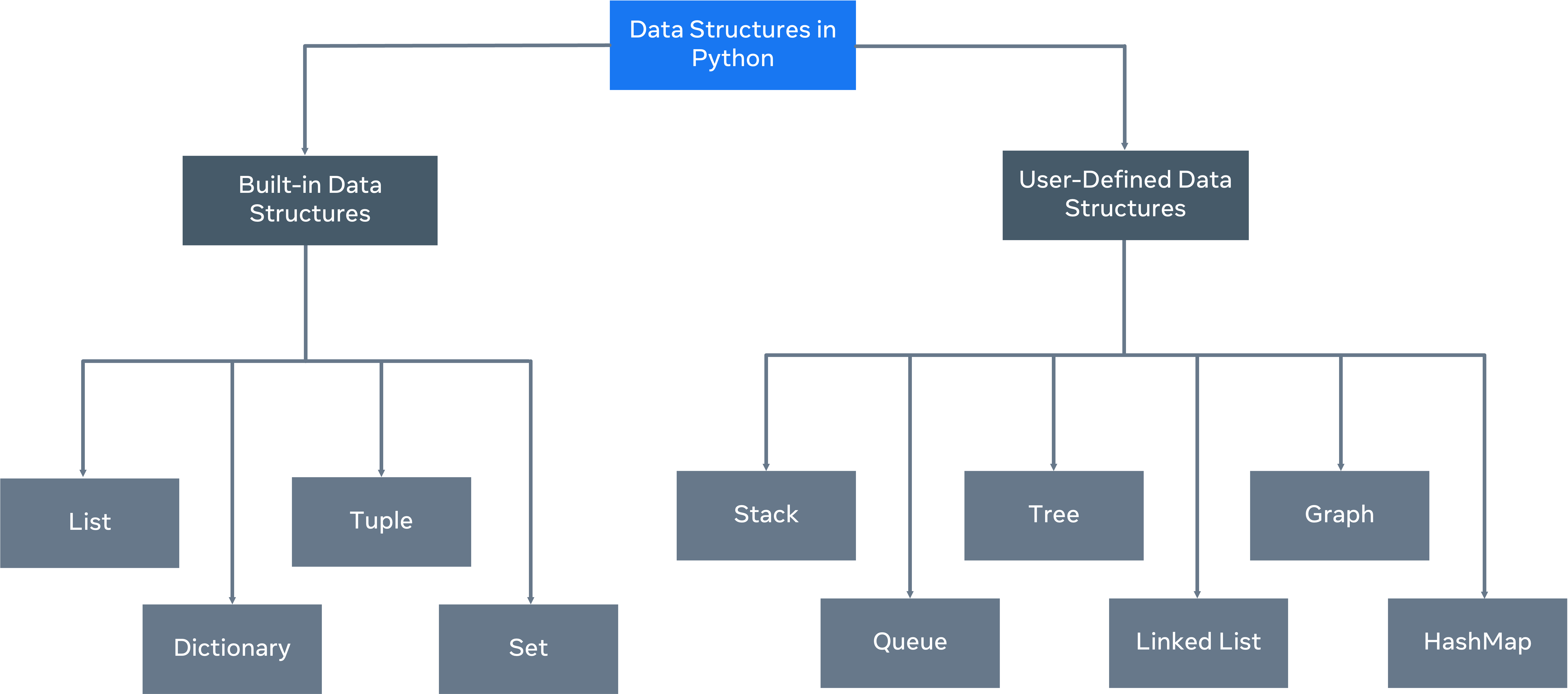
A data structure allows you to organize and arrange your data to perform operations on them. Python has the following built-in data structures: List, dictionary, tuple and set. These are all considered non-primitive data structures, meaning they are classed as objects, this will be explored later in the course.
Along with the built-in data structures, Python allows users to create their own. Data structures such as Stacks, Queues and Trees can all be created by the user.
Each data structure can be designed to solve a particular problem or optimize a current solution to make it much more performant.
Mutability and Immutability
Data Structures can be mutable or immutable. The next question you may ask is, what is mutability? Mutability refers to data inside the data structure that can be modified. For example, you can either change, update, or delete the data when needed. A list is an example of a mutable data structure. The opposite of mutable is immutable. An immutable data structure will not allow modification once the data has been set. The tuple is an example of an immutable data structure.
Lists
List
Lists are a sequence of one or more different or similar datatypes. A list in Python is essentially a dynamic array that can hold any datatype.
Examples
list1 = [1, 2, 3, 4, 5]

list2 = ['A', 'B', 'C']

list3 = ['Hello', 1, True, 40.22]
The type doesn’t necessarily matter. It’s just going to be stored in the same way.
One thing to keep in mind with lists is that they are based on an index.
Nested list
list1 = [1, 2, 3, 4, 5]

list2 = ['A', 'B', 'C']

list3 = ['Hello', 1, True, 40.22]

list4 = [1, [2, 3, 4], 5, 6]
That’s completely valid as well. Any datatype can be stored within the list itself, just to keep that in mind.
Print the whole list
list1 = [1, 2, 3, 4, 5]

print(*list1)
1 2 3 4 5list1 = [1, 2, 3, 4, 5]
print(list1 ,sep = " ")[1, 2, 3, 4, 5]Adding items to the list
list1 = [1, 2, 3, 4, 5]

print(list1 ,sep = " ")
list1.insert(len(list1), 6)
# index
print(list1 ,sep = " ")[1, 2, 3, 4, 5]
[1, 2, 3, 4, 5, 6]Instead of having to specify the index or where the items should be placed, I can just put it in the append keyword.
list1 = [1, 2, 3, 4, 5]

print(list1 ,sep = " ")

list1.append(6)

print(list1 ,sep = " ")
[1, 2, 3, 4, 5]
[1, 2, 3, 4, 5, 6]There is another function I can use if I wanted to add one or more items to the list.
list1 = [1, 2, 3, 4, 5]

print(list1 ,sep = " ")

list1.extend([6, 7, 8, 9])

print(list1 ,sep = " ")
[1, 2, 3, 4, 5]
[1, 2, 3, 4, 5, 6, 7, 8, 9]Removing item from list
list1 = [1, 2, 3, 4, 5]

print(list1 ,sep = " ")

list1.pop(4)
#       index
print(list1 ,sep = " ")
[1, 2, 3, 4, 5]
[1, 2, 3, 4]list1 = [1, 2, 3, 4, 5]
print(list1 ,sep = " ")
del list1[2]
print(list1 ,sep = " ")[1, 2, 3, 4, 5]
[1, 2, 4, 5]Iteration through lists
list1 = [1, 2, 3, 4, 5]

print(list1 ,sep = " ")

for x in list1:
    print('Value:', x)
[1, 2, 3, 4, 5]
Value: 1
Value: 2
Value: 3
Value: 4
Value: 5Tuples
A tuple can accept any mix of data types.
my_tuple = (1, 'strings', 4.5, True)
print(my_tuple)
(1, 'strings', 4.5, True)my_tuple = (1, 'strings', 4.5, True)
print(my_tuple[1])stringsmy_tuple = (1, 'strings', 4.5, True)
print(type(my_tuple))<class 'tuple'>TIP
Even if you don’t use parenthesis, it still is indicated as tuple.
my_tuple = 1, 'strings', 4.5, True
print(type(my_tuple))
<class 'tuple'>my_tuple = (1, 'strings', 4.5, True)
print(my_tuple.count('strings'))1my_tuple = (1, 'strings', 4.5, True)
print(my_tuple.index(4.5))2my_tuple = (1, 'strings', 4.5, True)
for x in my_tuple:
print(x)1
strings
4.5
Truemy_tuple = (1, 'strings', 4.5, True)
my_tuple[0] = 5
for x in my_tuple:
print(x)Traceback (most recent call last):
File "PATH", line 3, in <module>
my_tuple[0] = 5
~~~~~~~~^^^
TypeError: 'tuple' object does not support item assignmentThat’s because anything that is declared in a tuple is immutable.
Sets
set_a = {1, 2, 3, 4, 5}

print(set_a)
{1, 2, 3, 4, 5}Sets differ slightly from lists, in that they don’t allow duplicate values.
set_a = {1, 2, 3, 4, 5, 5}

print(set_a)
{1, 2, 3, 4, 5}set_a = {1, 2, 3, 4, 5, 5}
set_a.add(6)
print(set_a){1, 2, 3, 4, 5, 6}set_a = {1, 2, 3, 4, 5, 5}
set_a.remove(2)
print(set_a){1, 3, 4, 5}set_a = {1, 2, 3, 4, 5, 5}
set_a.discard(2)
print(set_a){1, 3, 4, 5}set_a = {1, 2, 3, 4, 5}
set_b = {4, 5, 6, 7, 8}
print(set_a.union(set_b)){1, 2, 3, 4, 5, 6, 7, 8}set_a = {1, 2, 3, 4, 5}
set_b = {4, 5, 6, 7, 8}
print(set_a | set_b){1, 2, 3, 4, 5, 6, 7, 8}set_a = {1, 2, 3, 4, 5}
set_b = {4, 5, 6, 7, 8}
print(set_a.intersection(set_b)){4, 5}set_a = {1, 2, 3, 4, 5}
set_b = {4, 5, 6, 7, 8}
print(set_a & set_b){4, 5}set_a = {1, 2, 3, 4, 5}
set_b = {4, 5, 6, 7, 8}
print(set_a.difference(set_b)){1, 2, 3}set_a = {1, 2, 3, 4, 5}
set_b = {4, 5, 6, 7, 8}
print(set_a - set_b){1, 2, 3}set_a = {1, 2, 3, 4, 5}
set_b = {4, 5, 6, 7, 8}
print(set_a.symmetric_difference(set_b)){1, 2, 3, 6, 7, 8}set_a = {1, 2, 3, 4, 5}
set_b = {4, 5, 6, 7, 8}
print(set_a ^ set_b){1, 2, 3, 6, 7, 8}NOTE
An additional important thing about sets is that a set is a collection with no duplicates but it’s also a collection of unaltered items. Unlike a list where I can print out content based on index.
set_a = {1, 2, 3, 4, 5}
set_b = {4, 5, 6, 7, 8}

print(set_a[1])
Traceback (most recent call last):
File "PATH", line 4, in <module>
print(set_a[1])
~~~~~^^^
TypeError: 'set' object is not subscriptableDictionaries
In a normal dictionary, to locate a word, you look it up by the first letter and then use the alphabetical ordering system to find its location. Likewise, Python dictionaries are optimized to retrieve values.
Dictionaries access values based on keys and not on index position. Therefore, they are faster and more flexible in operation.
With a Python dictionary, a key is assigned to a specific value. This is called the key-value pair. The benefits of this method is that it’s much faster than using traditional lists.
To find an item in a list, you need to keep reviewing the list until you locate the item. But in a Python dictionary, you can go straight to the item you need by using its key.
A dictionary is also immutable in that the values can be changed or updated.
Access
sample_dict = {1: 'Coffee', 2:'Tea', 3: 'Juice'}
print(sample_dict[1])CoffeeUpdate
sample_dict = {1: 'Coffee', 2:'Tea', 3: 'Juice'}
sample_dict[2] = 'Mint Tea'
Delete
sample_dict = {1: 'Coffee', 2:'Tea', 3: 'Juice'}
del sample_dict[3]
Iteration
Three different methods to iterate over the dictionary:
- standard iteration method,
- the items function
- or the values function
my_d = {}

print(type(my_d))
<class 'dict'>TIP
The key can be numeric, it can be string.
my_d = {1: 'Test', 'Name': 'Jim'}

print(type(my_d))
<class 'dict'>my_d = {1: 'Test', 'Name': 'Jim'}
my_d[2] = 'Test 2'
print(my_d){1: 'Test', 'Name': 'Jim', 2: 'Test 2'}my_d = {1: 'Test', 'Name': 'Jim', 1: 'Not a test'}
print(my_d){1: 'Not a test', 'Name': 'Jim'}my_d = {1: 'Test', 'Name': 'Jim'}
for x in my_d:
print(x)my_d = {1: 'Test', 'Name': 'Jim'}
for x in my_d:
print(x)1
Namemy_d = {1: 'Test', 'Name': 'Jim'}
for key, value in my_d.items():
print(str(key) + " : " + value)1 : Test
Name : Jimkwargs
Using these has the advantage that you could pass in any amounts of non-keyword variables, and keyword arguments.
def sum_of(a, b):
    return a + b

print(sum_of(4, 5))9def sum_of(a, b):
return a + b
print(sum_of(4, 5, 6))Traceback (most recent call last):
File "PATH", line 4, in <module>
print(sum_of(4, 5, 6))
^^^^^^^^^^^^^^^
TypeError: sum_of() takes 2 positional arguments but 3 were given def sum_of(*args):
sum = 0
for x in args:
sum += x
return sum
print(sum_of(4, 5, 6))15TIP
argshere is a tuple. The name can be different too.
def sum_of(**kwargs):
    sum = 0
    for k, v in kwargs.items():
        sum += v
    return sum

print(sum_of(coffee=2.99, cake=4.55, juice=2.99))10.530000000000001WARNING
There is two stars before
kwargs!
TIP
The type of the
kwargshere is dictionary. The name can be different too.
Choosing and using data structures
This reading illustrates the importance of chosing the correct data structure for the task at hand.
Which data structure to choose?
The tricky part for new developers is understanding which data structure is suited to the required solution. Each data structure offers a different approach to storing, accessing and updating the information stored inside it. There can be many factors to select from, including size, speed and performance. The best way to try and understand which one is more suitable is through an example.
Example: Employees list
In this example, there’s a list of employees that work in a restaurant. You need to be able to find an employee by their employee ID - an integer-based numeric ID. The function get_employee contains a for loop to iterate over the list of employees and returns an employee object if the ID matches.
employee_list = [(12345, "John", "Kitchen"), (12458, "Paul", "House Floor")]

def get_employee(id):
    for employee in employee_list:
        if employee[0] == id:
            return {"id": employee[0], "name": employee[1], "department": employee[2]}

print(get_employee(12458))
In this code, employee_list is a list of tuples. The code runs well and will return the user Paul, as its ID, 12458, is matched. The challenge comes when the list gets bigger.
Instead of two employees, you may have 2000 or even 20,000. The code will have to iterate over the list sequentially until the number is matched.
You could optimize the code to split the search, but even with this, it still lacks in performance in comparison to other data structures, such as the dictionary.
employee_dict = {
    12345: {
        "id": "12345",
        "name": "John",
        "department": "Kitchen"
    },
    12458: {
        "id": "12458",
        "name": "Paul",
        "department": "House Floor"
    }
}

def get_employee_from_dict(id):
    return employee_dict[id];


print(get_employee_from_dict(12458));
Notice how, in this code block, if you change the data structure to use a dictionary, it will allow you to find the employee. The main difference is that you no longer need to iterate over the list to locate them. If the list expands to a much larger size, the seek time to find the employee stays the same.
This is a prime example of how to choose the right data structure to suit the solution.
Both work well, but the trade-off to be considered is that of time and scale. The first solution will work well for smaller amounts of data, but loses performance as the data scales.
The second solution is better suited to large amounts of data as its structure allows for a constant seek time allowing large amounts of data to be accessed at a constant rate.
This example shows that there is no one size fits all solution and careful consideration should be given to the choice of data structure to be used depending on the constraints of the solution.
Additional resources
Here is a list of resources that may be helpful as you continue your learning journey.
Learn more about Python data structures (Python documentation) on the Python website: Python.org - Data structures
Explore common Python data structures at the Real Python website: Real Python - Data structures
FunctionDate-StructurePythonscope
Previous one → 2.Control flow and conditionals | Next one → 4.Errors, Exceptions and File handling