Over the past 20 years, we have seen dramatic jumps in technological gains in areas of
Distributed Computing
Cloud Computing
AI Improvements
Programming history:
A lot of human error in the calculations → A Solution →Difference engine
INFO
The difference engine used mechanical gears with numbers 0 to 9 etched onto their gaps separated by gear’s teeth. Its key function was to carry out one operation that was computed by manually moving hand cranks until the final answer was revealed.
After building a working prototype, Babbage spent many years working on further improving his designs and constructing improved versions of the original idea. He created another device called a different engine two, but ultimately produced a new and better concept called the analytical engine.
The analytical engine is widely accepted as being the basics of modern day computing. Babbage’s friend, Ada Lovelace published a document describing how the analytical engine could perform a sequence of calculations, which is essentially what a computer program does.
However, the analytical engine was never completed and Babbage, like a lot of developers did not invest in good documentation.
Computers only understand binary code, which consists of two digits 0 and 1. 0 and 1 relate to different electrical states similar to a light switch, 0 is equal to off and 1 is equal to on.
Decimal (0,9)
Binary (0,1)
0
0
1
1
2
10
3
11
4
100
5
101
Computer represents the binary code by using tiny electrical conductors called transistors. These transistors are housed inside the central processing unit. CPU, which is essentially the brain of the computer.
TIP
When a program is written using any type of language it needs to be compiled or interpreted. The outcome is to turn readable programming code for us into readable programming code for the computer.
Programming
Programming is the ability to provide a computer with a set of instructions in a particular language that it can understand and perform those operations or tasks. In other words, you need to tell the computer what you wanted to do in a format and language it can understand.
TIP
Programming is a skill. The more you practice and learn, the better you become.
Python was created by Guido van Rossum and released in 1991. It was designed to be readable and takes a lot of similarities between the English language and mathematics. Since its release, it has gained greatly in popularity and supports a rich selection of frameworks and libraries.
At present, it’s currently one of the most popular programming languages to learn today. It’s widely used in all areas of business, such as web development, artificial intelligence, machine learning, data analytics and various different programming applications.
Web development
Artificial intelligence
Machine learning
Data analytics
TIP
One of Python’s key advantages is that it makes developers very productive and allows projects to be completed more quickly.
The simplistic nature of Python abstracts a lot of complexity away from the developer to allow them to focus on the task at hand.
TIP
It lends well to the philosophy of write less, do more.
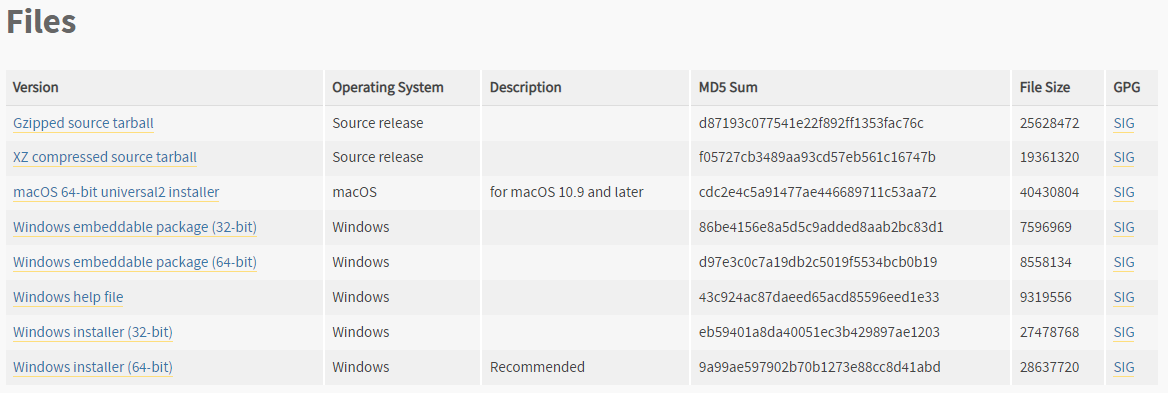
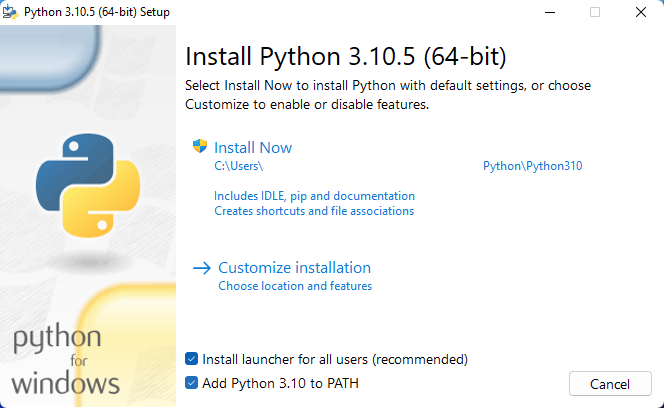
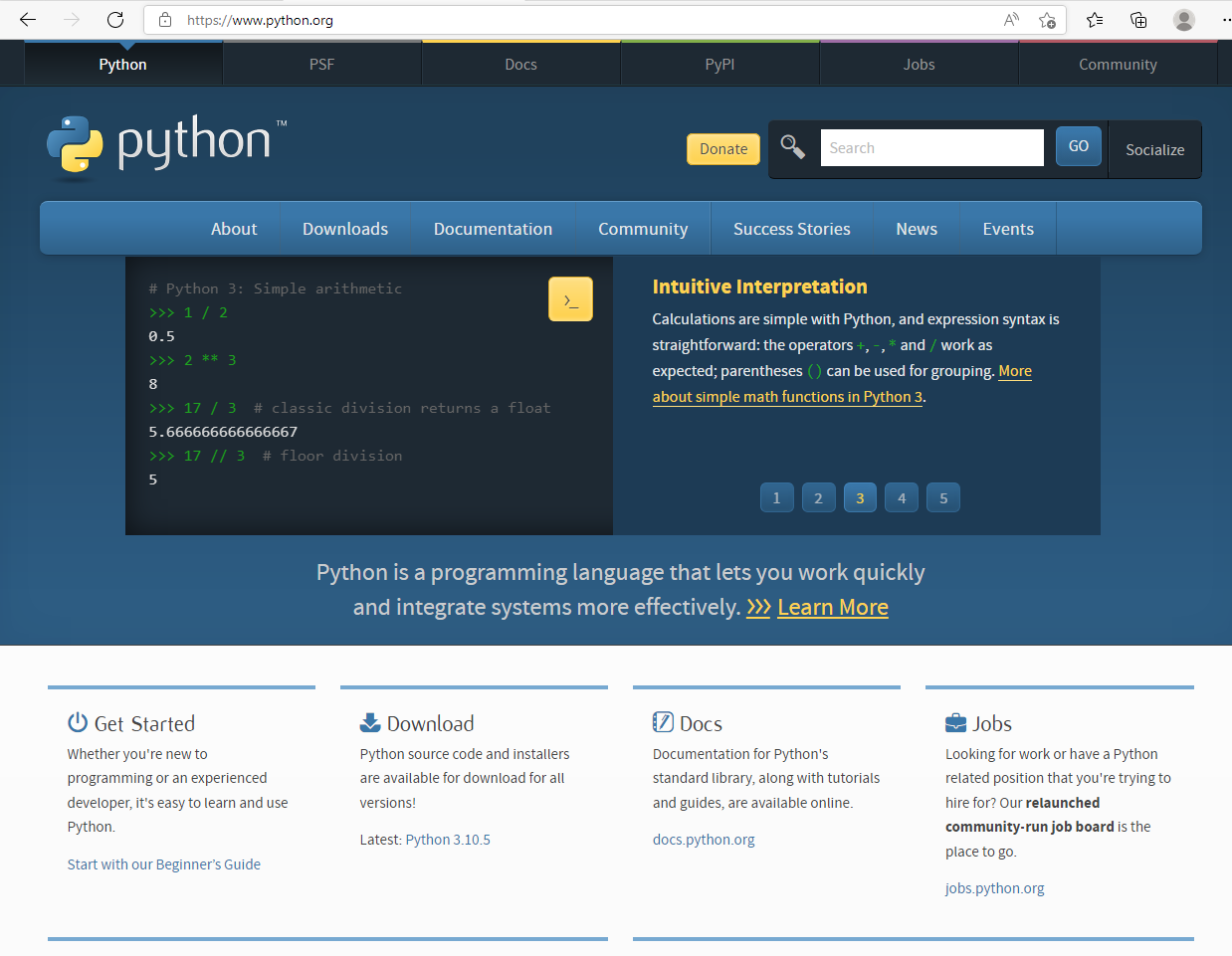
If you want to work on your local device and have a Windows machine you will need to install Python. To install Python on Windows you first need to download the latest version from the python.org website.
On completion of this reading, you will be able to identify any required dependencies for your operating system.
Setting up Python on Windows is straightforward and it will install without any required dependencies. On Mac, however, you do need some additional dependencies prior to installing Python.
XCode
To install brew, you need to install Xcode first. Homebrew does not come with its own compiler and it needs Xcode installed for it to work correctly. To install Xcode do the following:
Open a terminal.
Run the following: shell xcode-select --install
A popup will appear asking you to confirm the installation. Click on the Install button.
Agree to the license agreement.
brew
Macs do not come with package managers like most Linux distributions. To make up for this an external tool called brew was created. To install brew, do the following:
/bin/bash -c "$(curl -fsSL https://raw.githubusercontent.com/Homebrew/install/HEAD/install.sh)"
The first way is using the Python shell, and the second way is to run a Python file directly from the command line terminal. The Python shell is useful for running and testing small scripts.
Let’s explore the second main way to run Python’s programs, which is running a Python file directly from the command line or terminal.
NOTE
Note that any file that has the file extension of .PY can be run by following command.
VS Code is a better choice than using the Python shell or running it directly from the terminal because besides including both of these options, it comes with a plethora of additional improvements that make coding in Python a better experience.
Auto-completion
Debugging
Code syntax
Highlighting
Whitespace
Indentation helpers
There are two options run programs through Python.
One is to run directly from the command line or the terminal if you’re on Mac,
and then the other option is run directly from the IDE, which in this case is Visual Studio Code.
On completion of this reading, you will be able to explain why and where to use comments in coding.
Adding comments to code not only helps you as a developer but also helps other members of your team. Comments are great for refreshing your memory of code you may have written months ago and you may have forgotten what it was intended to do. There are multiple reasons why you need to add comments to a code file. They can range from the following:
Explaining what the code is intended to do.
Let developers know that code is deprecated.
Add TODO comments for work to be completed at a later time.
Below are examples of the different types of comments that can be used.
Single-line comments
The use of a # symbol tells Python to ignore everything after this point until the end of the current line.
# Don't try to Run Me, I'm a commentx = 10
Multi-line comments
Python does not really have a method of declaring multiline comments so a # symbol can be used at the beginning of every line of the comment.
# The function below accepts two integers and# adds both numbers to return the value.def add_two_numbers(a, b): return a + b
Inline comments
The # symbol tells Python to ignore everything after this point until the end of the current line, this allows the placement of comments within the code itself. Inline comments should be used to supply important information about the code they deal with.
x = 1 # Resetting buffer size
Remember to always have a reason for a comment, they should supply information to the reader and not be a distracting nuisance
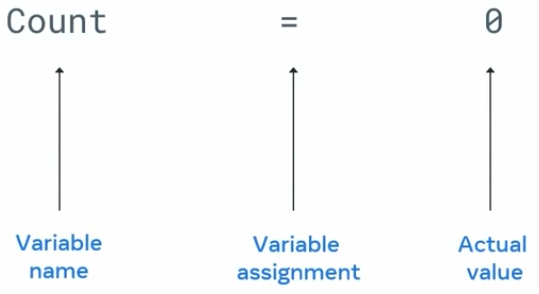
For a variable that has already been declared, you only need to reassign or redeclare it.
The examples so far have relied on simple naming conventions such as X, Y, and Z. When working on a project with other developers, it will become increasingly difficult to know what these variables mean or refer to. As a programmer, you will write a loss of code over time, and if it’s been a few months, you’re most likely not remember exactly what the code was supposed to do. Using generic variables like X and Y doesn’t give any information about that variable and where it is used. Giving meaningful names to your variables that makes sense in the given context will allow you and other programmers to easily understand what’s going on.
NOTE
The key function of the variable is to keep a reference to some value.
Naming conventions
One option is called camelCase. The first letter of the first word is lowercase, and the first letter of every word after that is uppercase with no spaces between words.(eg. myName)
I can take a different approach with snake_case. When using snake_case, you keep everything in lowercase letters, but you use an underscore between words.(eg. my_name)
TIP
Although you have different options as a developer, it’s a good idea to be consistent when you are creating variables across your programs.
A data type is an attribute associated with a piece of data that tells a computer system how to interpret its value.
Knowing what data types to use ensures that data is collected in the preferred format. It also ensures that the value of each property is as expected.
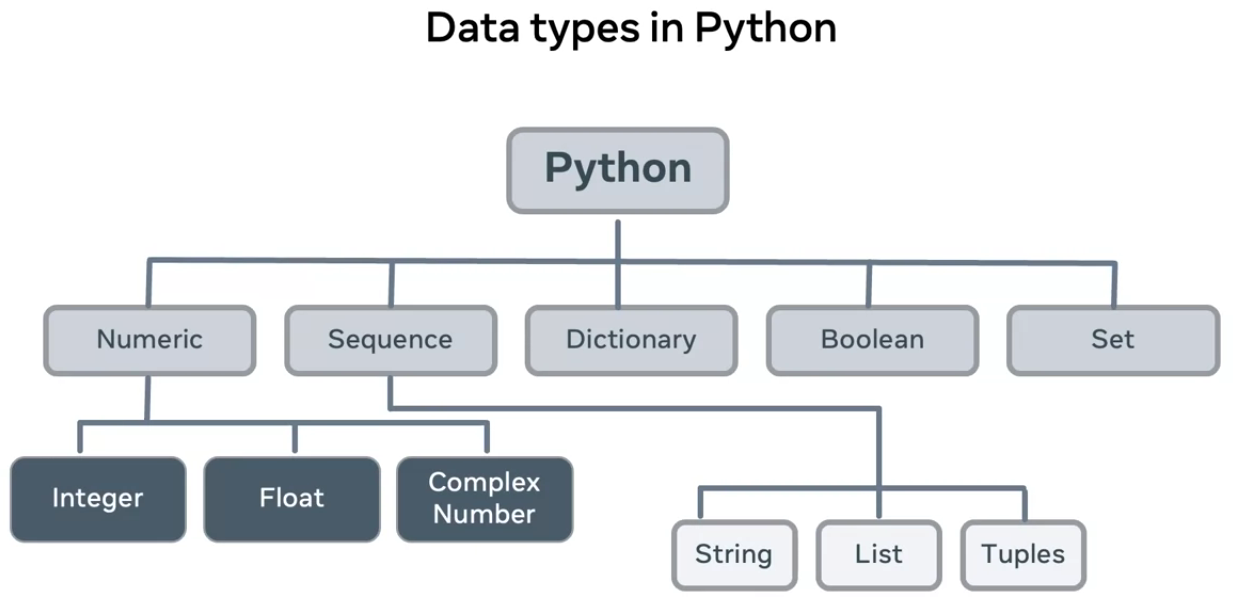
Python offers raw data types to allow data to be assigned to variables or constants. The five main types which are classed as literals consist of:
numeric,
sequence,
dictionary,
Boolean,
and set.
Numeric
Integers
Floats
Complex numbers
type()
To determine a type of variable, Python also provides a function names type, which will provide the class type based on the variable being passed.
type("hello")# <class 'str'>
The integer class
represents any non-fractional number, that is whole numbers with no decimal places. These numbers can be positive or negative.
Floats
are numbers that contain decimal places and are represented by the floats class.
The complex
class is used to represent complex numbers which are made up of both real and imaginary numbers.
a = 10 + 10j
Sequence
Sequence types of clusters container types that contain one or more of the same type in an ordered list. They can also be accessed based on the index in the sequence.
Python has three different sequence types, namely
strings,
lists,
and tuples.
String
is a sequence of characters that is enclosed in either a single or double quotes. Strings are represented by the string class or str for short.
Lists
are a sequence of one or more different or similar types. They are essentially an array and hold any type inside square brackets. Each item can be accessed by its index.
Tuples
are similar to lists in many ways. They contain an ordered sequence of one or more types, but the main difference is that they are immutable. This means that the values inside the tuple cannot be modified or changed. Tuples are represented by the tuple class and hold datatypes wrapped in parentheses.
Dictionary
Dictionary store data in a key value object structure. Each value can be accessed directly by its key. Dictionaries can also store any data type.
ed = {'a' : 22, 'b' : 44.4}ed['a']
22
Boolean
Boolean data types which are simply represented as true or false. Combined with logical operators, Booleans are used to check whether a condition is true or false.
type(True)type(False)
<class 'bool'><class 'bool'>
Set
which is an unordered and non-indexed collection of non-repeated values.
A sequence of characters in single or double quotes.
'We are open'"24 hours a day!"
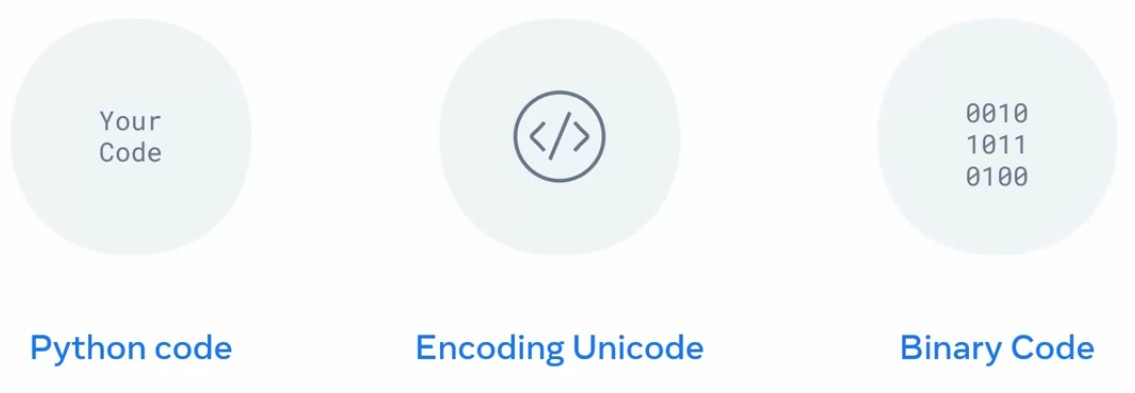
Computers only understand binary code, which consists of ones and zeros. This means that characters need to be converted to a form that computers can interpret, a process known as encoding. Python uses a type of encoding called Unicode to communicate with computers.
Single Line
varA = "Hello World"
Multi Line
varB = "This is too \big to fit \on a single line so \you multi-lined it"
NOTE
It’s important to know that a string is just a sequence of characters, which in turn means it is essentially an array. Each character in the sequence can be accessed based on its index.
len()
name = 'John'len(name)# 4
Concatenation
a = 'Hello'b = 'There!'print(a + b)
HelloThere!
TIP
The plus symbol is usually used as an arithmetic operator, but when applied on strings, it combines them instead.
Placing a # symbol in front of the text you want to be a comment causes Python to ignore everything from that point until the end of the current line.
# Single Line comment
Multi-line comments
Python does not really have a method for multi line comments, so a # symbol can be used on every line.
# This is a multiline comment# which can be used for long comments
Inline/code comments
The # symbol will cause Python to ignore everything from that point until the end of the current line, so inline comments can be created in this way.
x = 1 # assigns value of 1 to x
Built-in Functions
print()
This function looks for the default output device, your terminal, and displays the value passed to it.
print("Hello")
input()
This function looks for the default input device, your keyboard, and captures the value. This value can then be assigned or used.
print("Where do you live?")location = input()print("So you live in " + location)
len()
This function returns the length or the count of the elements contained within the structure it is applied on. This may be a string, array, list, tuple, dictionary or any sequence.
len("Hello")5
str()
This function can be used to convert the provided value into a String.
str(55)'55'
int()
This function can be used to convert the provided value into an int.
int('75')75
float()
This function can be used to convert the provided value into a float.
some_int = 10float(some_int)10.0
Creating Functions
Functions in Python require a keyword to define them : def followed by an identifier (a name) this forms the function signature. The body of the function contains the code to run when the function is called.
def say_hello(): return "Hello there!"# With parametersdef say_hello(you): return "Hello " + you
Typecasting is the process of converting one data type to another.
Python has two different types of conversions;
implicit
explicit
Implicit
Implicit data type conversion is performed automatically by Python’s compiler to prevent data loss.
It will convert, for example, an int to a float if it picks up that the inserted value is a decimal.
WARNING
Python will only be able to convert values if the data types are compatible. int and float are compatible but Strings and int are not. If data types are not compatible, Python will throw a type error.
Explicit
Using Python functions.
There are many functions but some of the most common are
string
integer
float
string cost function
This is used to convert any datatype into a string datatype.
# str()str(11)
'11'
int type casting function
# int()int('20.5')
20
float function
# float()float('50.4')
50.4
Some Other functions
ord() : which returns an integer representing the underlying unicode character.
hex() : which converts a given integer to a hexadecimal string.
oct() : which takes an integer and returns a string representing an oct to a number.
Python’s print function also has reserved keywords that can be parsed as additional arguments:
objects : that is values that are printed on screen
sep : which defines how the objects being printed or separated
end : which defines what gets printed at the end
file : which specifies where values get printed to, and by default it is STD out
flush : a Boolean expressions to flush the buffer, which essentially just moves the data from a temporary storage to the computers permanent memory storage
print('Hello', 'you!', sep=', ')
Hello, you!
Direct formatting
a = 10b = 5ans = a + bprint('Adding the value of {} and {} = {}'.format(a, b, ans))
Output formatting
print("i like {0} more than {1}".format("oranges", "grapes"))print("I like {1} more than {0}".format("oranges", "grapes"))
I like oranges more than grapesI like grapes more than oranges
Another, more informal way to refer to it is “data type conversion”.
The simplest example of converting data could be the following comparison:
print(10 == 10)
In the above piece of code, I’m asking Python if the number 10 is equal to the number 10, and I’ll get the boolean value of True printed, confirming that indeed, they are the same.
What if I do this?
print(10 == 10.00)
Again, the boolean value of True is output on the screen.
Now, you might complain that, well, 10 is not technically equal to 10.0 - because, one might argue, the first number is an integer, and the second number is a float. You would be right - although these are the same numbers, they are not the same data types.
However, Python here performs what’s known as “implicit type conversion”.
To understand how this works, I’ll slightly tweak the previous example. Instead of asking Python to compare the two numbers and return if they are the same or not, I’ll ask Python to print the result of adding these two numbers together.
print(10 + 10.0)
The printed result is 20.0.
This output allows me to conclude that when Python runs operations involving integers and floats, it implicitly converts the integers type to a float, and then completes the operation.
To really drive this point home, I can extend my previous example, using the type() function:
print(type(10 + 10.0))
The output is <class 'float'>, so this confirms my conclusion.
Let me know show you a small program in Python, working with numbers:
user_num_1 = input('First number is: ')user_num_2 = input('Second number is: ')user_sum = user_num_1 + user_num_2print(user_sum)
When I run this program, I could, for example, provide the first number’s value as 5, and the second number’s value also as 5, expecting that the printed user_sum value will be 10.
However, when I do exactly that, the number 55 gets printed instead.
Why was this not working?
Well, the answer is pretty simple: everything that a user types in, is converted, by Python, to the string data type.
This means that, although I typed numbers into these two inputs, what was saved in user_num_1 and user_num_2 were actually strings.
Effectively, it’s exactly the same as if I just did this:
This time, the output of printing user_sum is still “55”, but this comes at no surprise.
In order to have my Python code work as I intended, I need to perform explicit type conversion.
In other words, I have to convert the value of “5” to the value of 5.
Here’s my updated code:
user_num_1 = input('First number is: ')user_num_2 = input('Second number is: ')user_sum = float(user_num_1) + float(user_num_2)print(user_sum)
What I’m doing here is, I’m making sure that my program can handle even accepting floats as inputs, and still work correctly.
In other words, I’m making sure that if a user provided, say, the float value of 5.5 as both the first and second numbers when running the above code, the output would not throw an error. Instead, it will be the expected 11.0.
What if I decide to output some words to the user, telling them what happened?
Here’s an attempt at doing that:
num_1 = input('First number is: ')num_2 = input('Second number is: ')user_sum = float(num_1) + float(num_2)print("The sum of: " + num_1 + " and " + num_2 + " is " + user_sum)
If I run the above code, it will throw the following error:
Traceback (most recent call last): File "<string>", line 4, in <module>TypeError: can only concatenate str (not "float") to str
What this means is, I cannot concatenate a string and a float like that. In other words, although Python’s implicit type conversion works when I use the + operator on strings and integers, it does not work on strings and floats.
The solution to this is to perform explicit type conversion, as follows.
n1 = input('First number is: ')n2 = input('Second number is: ')user_sum = float(n1) + float(n2)print("The sum of " + str(n1) + " and " + str(n2) + " is " + str(user_sum))
This time, the output is: The sum of 5.5 and 5.5 is 11.0.
Additional resources
Python allows you to do quite a lot with very little code. Compared to other languages such as Java or C#, Python has a much easier learning curve. It lends itself well to the “write less, do more philosophy”. Python developers are also in high demand and learning how to program in Python makes for a good career choice.
You can access the links below to learn more about programming in Python.
Check out the Python website to find out more about built-in functions: Python
Check out W3 Schools to learn more about coding and web development: W3Schools
Check out HackerRank to practice your new acquired Python skills: HackerRank