Views
If you are building a basic static website, all you need to do is upload your website files to a web server. However, if you’re building a dynamic website using a framework, you may need to get a retrieved data and render it to the browser. This data could be anything like the user’s name or a list of information.
In Django, you use something called a view to create the logic to present data to the end-users.
What is View?
In Django, a view is a function designed to handle a web request and return a web response such as an HTML document.
For a static file with no dynamic content, the HTTP request just needs to map to where the file is located and return that page for rendering. As the static page does not change, nothing else is needed.
Suppose the page is at the address of littlelemon.com/index.html, the web server will process the request and return a response containing the page index.html to the browser, which then renders the content. You may recall that this process is known as the HTTP request response cycle.
However, if you want to do the same thing with Django, you need to write a Python function to create something called a view.
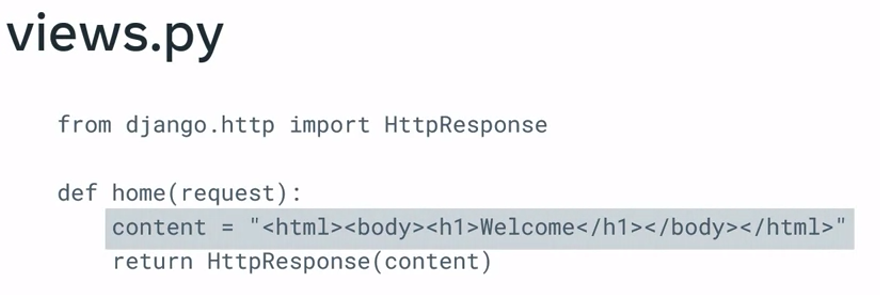
The code!
First, you import the class HTTP response from the django.http module.
from django.http import HttpResponseNext, you define a function called home, and this is known as the view function. Each view function takes an HTTP request object as its first parameter named request.
def home(request):WARNING
It’s important to know that the name you give the view function doesn’t matter, the function doesn’t need to be named in a certain way for Django to recognize it.
Next, you create a variable and use it to store a string containing the HTML to be returned. Once again, you can name this variable anything you want. In this example, it’s called content.
from django.http import HttpResponse

def home(request):
	content = "<html><body><h1>Welcome to little lemon</h1></body></html>"
Finally, you need to return this variable containing the code, and you do this by using the return statement with the HTTP response object. Inside the HTTP response, you place the variable.
from django.http import HttpResponse

def home(request):
	content = "<html><body><h1>Welcome to little lemon</h1></body></html>"
	return HTTPResponse(content)
You can also perform other programming logic inside of view functions such as processing data for emails and forms, retrieving data from a database, transforming data, and rendering templates.
NOTE
It’s important to know that you create view functions inside the views.py file as a best practice. You can theoretically name the file anything that you like. But it is a good practice to keep it as views.py as it makes it easier for your fellow developers working on the same project.
Routing
It’s important to know that creating a view function is not enough to make the request response work. The view function needs to be mapped to a URL so when the request to the URL is made, the view function gets called. This process of mapping a URL to a view function is known as routing.
To set up this routing to map URLs to views, you will need to create a new file. Inside your project app, create a new file called urls.py. You may recall that the project has a file with this name also.
You will learn about the difference between them later. Inside the urls.py file of the app, you first import the path function.
from django.urls import path
from . import views
Notice that both files are in the same directory.
Next, to create a route and map a URL to a view, you need to create a list sequence using the variable, urlpatterns.
This variable is assigned to a list that contains the URL paths that you want to create inside the app. The URL patterns list can contain multiple paths, and each path is created using the path function.
The function can accept arguments and two are acquired.
- The first argument is the route, which is a string that contains a URL pattern
- The second argument is the view, which contains the relative path and the name of the view function
from django.urls import path
from . import views

urlpatterns = [
	path('', views.home),
]
Creating views and mapping to URLs
Most websites or web applications provide a homepage when you type in the name of the URL or click on the website link from a search engine. The homepage is returned when only a request for a URL with the domain name is sent.
To design URLs for an app, you create a Python module informally called a URLconf or URL configuration.
The URL configurations used by the view functions in Django are created and updated in the urls.py file.
Django by default creates a urls.py file at the project level. But additionally, it’s best practice to create a urls.py at the app level. This way, the respective URLs for an app are clustered. But the project also needs to know what URLs are used inside each app.
For example, in Django, when a user makes a request for a URL, this request is first handled by the urls.py file at the project level.
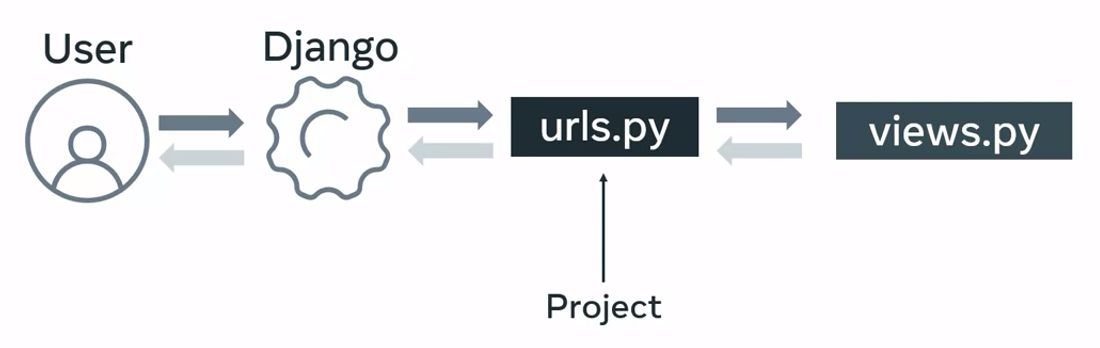
Django looks for the variable URL patterns. However, the code that contains the logic for the URL mapping is at the app level.
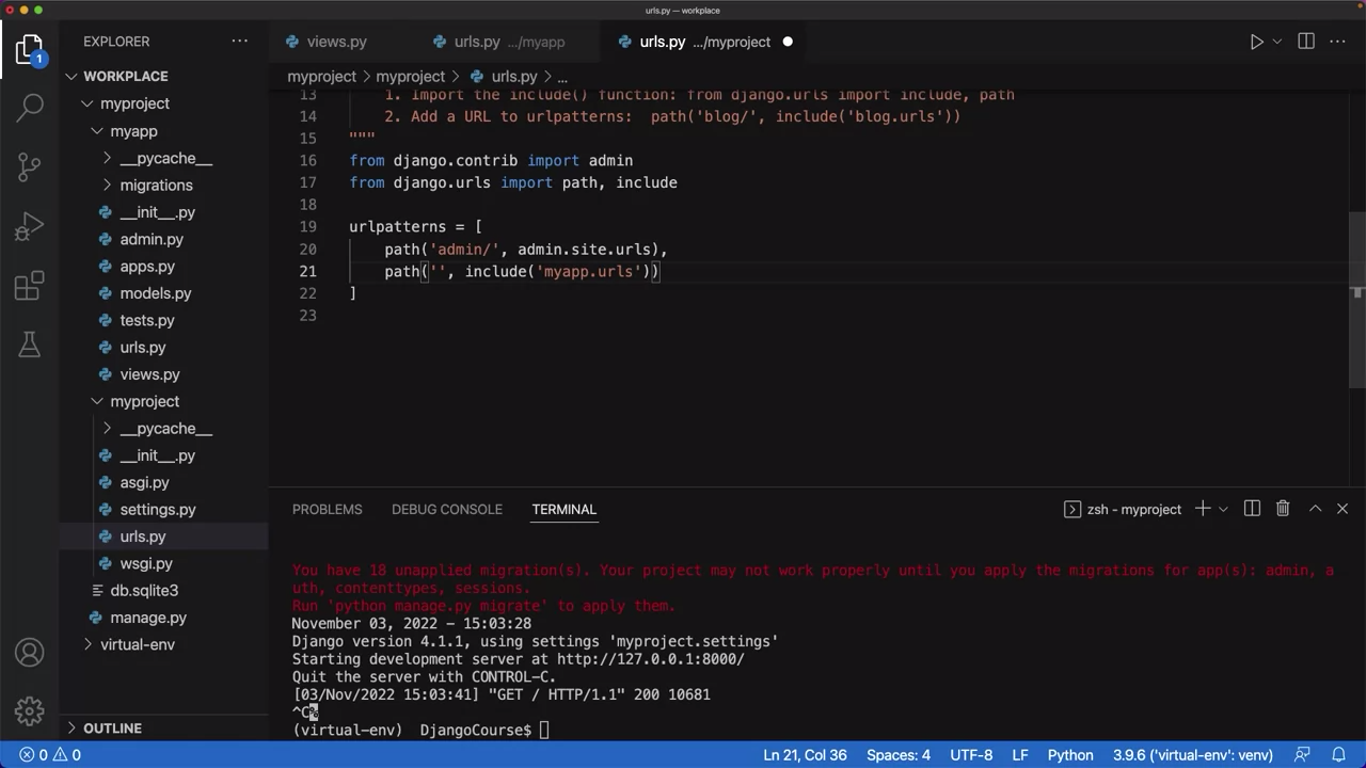
You need a way to tell Django to also check the urls.py file at the app level. You do this by using the include function.
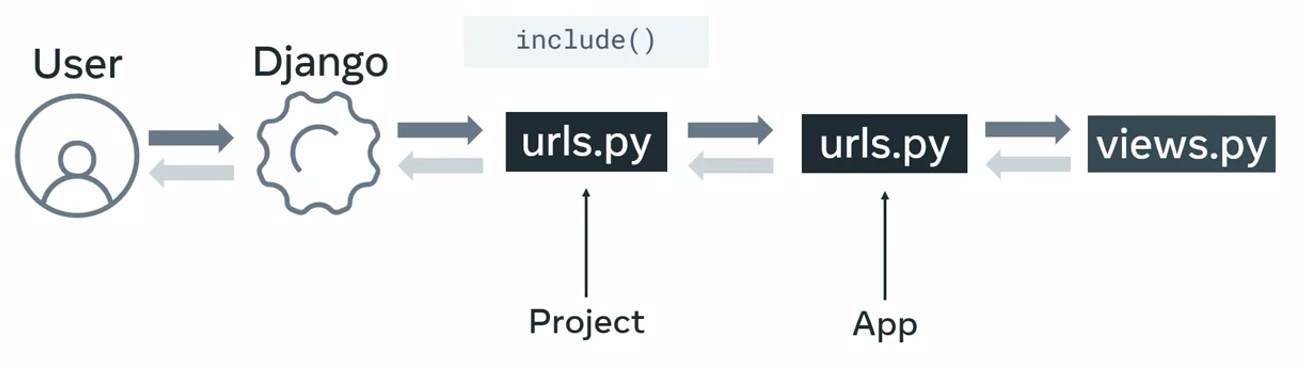
In the urls.py file at the project level, you create a new path inside the URL patterns list. Then inside the path function, you pass a reference to the app level urls.py file as the view argument. This allows the project level to access the app level URLs.
from django.contrib import admin
from django.urls import path, include

urlpatterns = [
	path('admin/', admin.site.urls),
	path('', include('restaurant.urls'))
]
By using the include function, the project level urls.py can inherit the app level URL configurations.
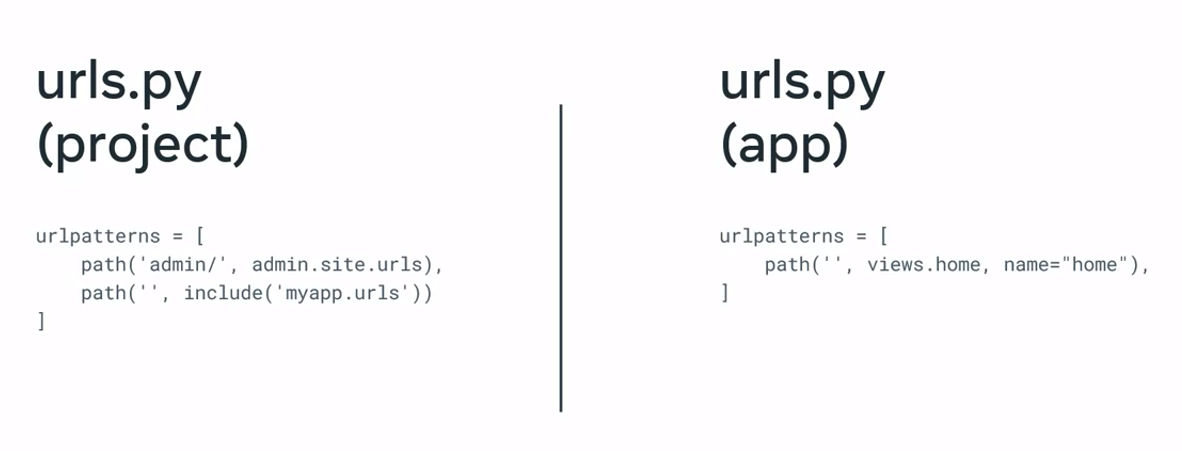
Example
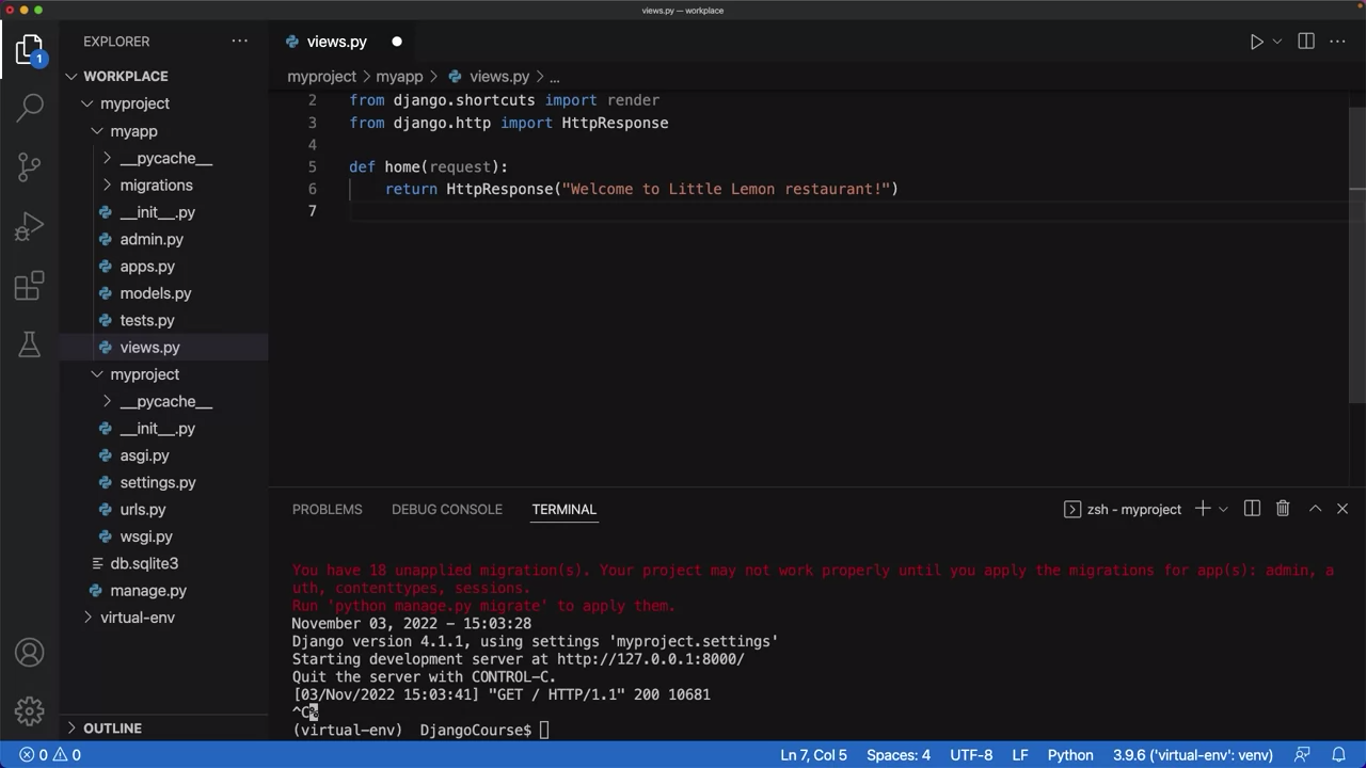
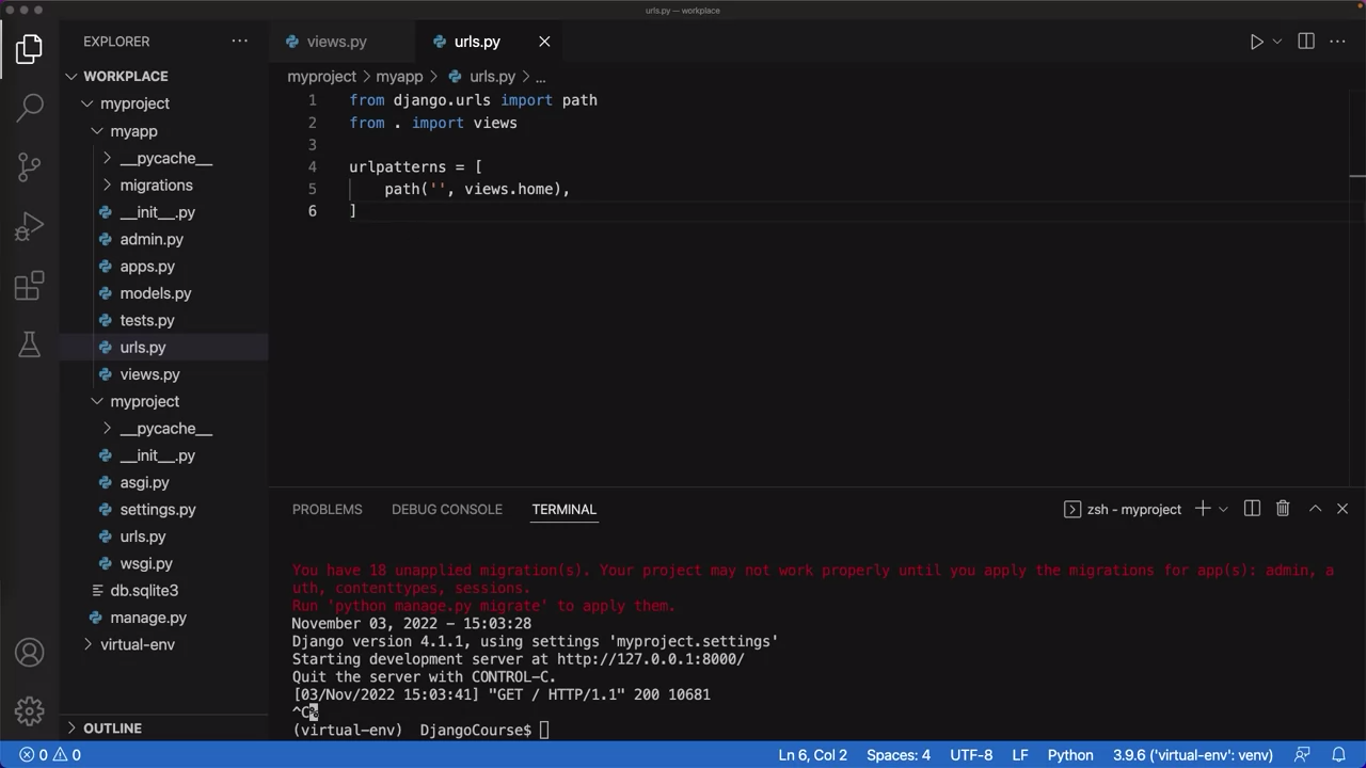
Because the file’s urls.py file and views.py file are in the same folder, you only need to provide the name of the file without the.py extension where the view function is located, and then a dot and the name of the view function. Notice that VS Code highlights the word views in the code. This means that in order to use the views.py file, it must be imported.
NOTE
It’s important to remember to add a comma at the end of this path function to match the parsing that Django performs.
View logic
The view plays a pivotal role in Django’s MVT architecture. On one side, Django’s URL dispatcher invokes a corresponding view function that matches the URL pattern.
On the other side, the view interacts with both the model and template layers.
What does the view do?
The primary role of the view function is to fetch the data from the client’s request, apply a certain processing logic to it and send an appropriate response back to the client.
It receives the request data in an object of class HttpRequest.
For simplicity, you can say models are equivalent of a database in Django. The view function interacts with the model in either of two ways. It either fetches all or certain objects from the model such as the database table mapped with the model.
Or the request parameters are used to add a new instance of the model thereby inserting a new row in the mapped table.
The client uses the HTTP GET method to provide the data from the model or delete a certain instance. On the other hand, it uses the POST method to indicate that the data in the request is to be used to perform an insert or update operation.
While you will learn about models soon, it is good to know the fundamentals. In the upcoming modules of this course, you’ll learn how to perform these model operations.
GET and POST methods
Schematically, this behavior is implemented as below:
from django.shortcuts import render

def myview(request):

    if request.method=='GET':
        #perform read or delete operation on the model

    if request.method=='POST':
        #perform insert or update operation on the model
from django.shortcuts import render
def myview(request):
if request.method=='GET':
val = request.GET['key']
#perform read or delete operation on the model
if request.method=='POST':
val = request.POST['key']
#perform insert or update operation on the model At the end of performing any process, you would want to let the user know about the result.
The return value of the view function is a HttpResponse object containing the actual contents of default content_type as “text/HTML” and the status code.
Additionally, it contains some header information. However, you would also want the view to give a well-formatted response.
Since the web browser is the client of your web application, the response should be in HTML format as a web page, called a web template.
The Django view loads the template web page, inserts certain context data at the placeholders marked with tags, and returns it as the response.
View rendering template
from django.shortcuts import render

def myview(request):

      if request.method=='GET':
            #perform read or delete operation on the model

      if request.method=='POST':
            #perform insert or update operation on the model
            context={ } #dict containing data to be sent to the client

      return render(request, 'mytemplate.html', context)
Class based views
In the above discussion, myview is a regular Python function.
Such views are called function based views. The processing logic in it is very imperative in nature, hence it may be repetitive.
Also, it uses conditional blocks for GET and POST requests. Django offers a more concise alternative in the form of a class-based view.
You create a sub-class of the View class and override its get() and post() methods to separately and cleanly define GET and POST operations.
from django.views import View
class MyView(View):
    def get(self, request):
        # logic to process GET request
        return HttpResponse('response to GET request')

    def post(self, request):
        # <logic to process POST request>
        return HttpResponse('response to POST request')
Generic views
Django makes the view declaration process still easier with its generic class-based views. The django.views.generic module contains several view classes that provide the functionality required to perform tasks such as rendering a template, showing an instance, showing the list of instances, adding a new model instance, updating an instance and so on.
Some generic views are TemplateView, CreateView, ListView, DetailView, UpdateView to name a few.
You need to subclass the generic view and set the properties like model and template_name. Django will internally perform all the heavy lifting which you had to do by yourself in a function-based view.
You will be working with the class based views in a later module of this course. As this is an introductory course, understanding the fundamentals of building views is important with the function based views. Class based views and Generic views are however widely used and an important topic to be understood as you progress with your journey in web development.
Creating views and view logic
# views.py

from django.shrotcuts import render
from django.http import HttpResponse

def say_hello(request):
	return HttpResponse("Hello World!")
# urls.py (project level)
from django.contrib import admin
from django.urls import path
from myapp import views
urlpatterns = [
path('admin/', admin.site.urls),
path('say_hello/', views.say_hello),
]→
# views.py

from django.shrotcuts import render
from django.http import HttpResponse

def say_hello(request):
	return HttpResponse("Hello World!")

def homepage(request):
	return HttpResponse("Welcome to Little Lemon!")
# urls.py (project level)
from django.contrib import admin
from django.urls import path
from myapp import views
urlpatterns = [
path('admin/', admin.site.urls),
path('say_hello/', views.say_hello),
path('homepage/', views.homepage),
]→
# views.py

from django.shrotcuts import render
from django.http import HttpResponse
from datetime import datetime

def say_hello(request):
	return HttpResponse("Hello World!")

def homepage(request):
	return HttpResponse("Welcome to Little Lemon!")

def display_date(request):
	date_joined = datetime.today().year
	return HttpsResponse(date_joined)
# urls.py (project level)
from django.contrib import admin
from django.urls import path
from myapp import views
urlpatterns = [
path('admin/', admin.site.urls),
path('say_hello/', views.say_hello),
path('homepage/', views.homepage),
path('display_date/', views.display_date),
]→
# views.py

from django.shrotcuts import render
from django.http import HttpResponse
from datetime import datetime

def say_hello(request):
	return HttpResponse("Hello World!")

def homepage(request):
	return HttpResponse("Welcome to Little Lemon!")

def display_date(request):
	date_joined = datetime.today().year
	return HttpsResponse(date_joined)

def menu(request):
	text = """<h1 style="color: #F4CE14;"> This is Little Lemon again!</h1>"""
	return HttpsResponse(text)
# urls.py (project level)
from django.contrib import admin
from django.urls import path
from myapp import views
urlpatterns = [
path('admin/', admin.site.urls),
path('say_hello/', views.say_hello),
path('homepage/', views.homepage),
path('display_date/', views.display_date),
path('menu', views.menu),
]Previous one → 4.Web Frameworks and MVT | Next one → 6.Requests and URLs